


Blog
Progress Tracking Comes to iPad: Close the Gap Between Field and Office
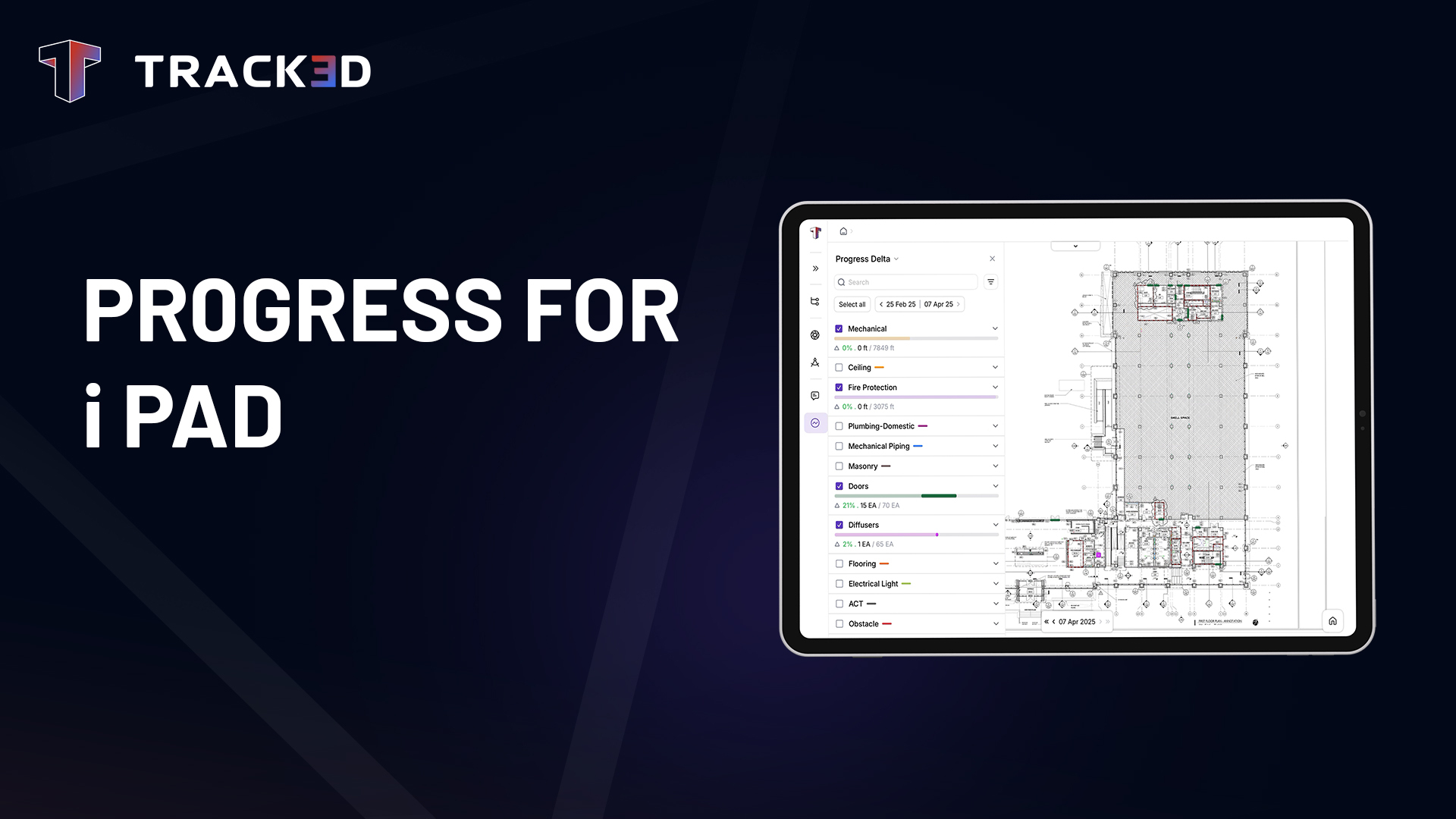
If you’ve ever watched a superintendent frantically scribble notes on a printout, only to hand them off to someone back at the office to enter into the system hours later, you know the problem. Field teams see progress happen in real time. But that information? It takes a detour before anyone else can see it.
That changes now.
We’re bringing Progress Tracking to iPad, the device your teams already carry on-site. No more delays. No more playing telephone with progress updates. No more wondering if what you’re seeing in the dashboard matches what’s actually happening in the field.
The Problem We're Solving
Here’s what we kept hearing: “Why can’t I just mark progress on my iPad while I’m standing right here?”
Fair question. iPad is where site teams live. It’s rugged enough for the job site, portable enough to carry from level to level, and always within arm’s reach. But until now, progress tracking wasn’t available there.
So, what happened instead? Field engineers would either:
- Call or text updates to project coordinators who’d enter them later
- Take photos and mark them up, creating a separate tracking system
- Wait until they got back to a computer to log what they saw hours ago
Every one of those workarounds introduces lag, increases the chance of errors, and adds frustration on both ends. The person in the field knows exactly what’s done. Why should they need a middleman to record it?
The Reality of Fieldwork
Not every day gets captured. Not every corner is accessible. But nothing stops you from recording real progress.
That’s the reality of construction. Sometimes the photographer can’t make it to site. Sometimes the area you need to document is behind scaffolding, in a tight ceiling space, or blocked by equipment. Sometimes you just need to record that a milestone was hit without staging a full photo capture.
Progress tracking shouldn’t be held hostage by perfect conditions. If the work happened, you should be able to mark it—period. That’s why we built this with the field reality in mind, not the ideal scenario.
What's New
With Progress Tracking on iPad, your field teams can now:
Mark progress directly on-site: Open your floor plan, draw the asset, assign the category and stage, and save it, right from the field. The same permissions you have on web apply here. If you can mark progress on your computer, you can mark it on your iPad.
Work with confidence, even in low-connectivity areas: We know site connectivity is unpredictable. Before you head out, download your project data—floor plans, existing progress, all of it. Then work locally throughout the day. When you’re back in range, your changes sync automatically. No data loss. No duplicate entry. (Full offline editing and conflict resolution coming soon.)
Switch between views that matter: Need to see cumulative progress? Done. Want to compare two dates to see what changed? You can do that too. Asset creation happens in cumulative single mode, keeping the workflow clean and intentional.
Create snapshot dates without needing a capture first: Sometimes you just need to mark a date for record-keeping. Now you can, without the extra steps. (coming soon)
Why This Matters
Let’s talk about what this actually means for your projects.
Speed. Progress updates that used to take hours or even a full day now happen in minutes. The superintendent walks the site in the morning, marks what’s complete, and by lunch, the entire team—from the trailer to the corporate office—sees the same picture.
Accuracy. When the person doing the work is also the person recording it, you eliminate the translation errors that creep in when updates pass through multiple hands. No more “I thought you meant the north wall” confusion.
Autonomy. Field teams don’t need to wait on anyone. They’re empowered to document, update, and communicate progress on their own terms, which means they stay in flow instead of stopping to coordinate with back-office support.
Consistency. Same platform. Same permissions. Same data model. Whether you’re on an iPad in a highrise or at a desktop in the project office, you’re working in the same system with the same rules. That simplicity matters when you’re managing teams across multiple sites.
Who Benefits Most
Field Engineers can finally close the loop on-site. Mark completed work as you inspect it. No notes. No callbacks. Just done.
Superintendents get the flexibility to review progress anywhere on-site without lugging a laptop around. Pull up the plan on your iPad, check what’s been marked, and keep moving.
Project Managers see updates faster, which means better forecasting, fewer surprises, and more confident conversations with clients and stakeholders.
What's Next
This is just the beginning. Full offline editing with smart conflict resolution is coming soon—so multiple team members can mark progress offline, and the system will intelligently handle any overlaps when you sync. We’re also adding zone-based tracking, so you can focus on specific project areas without navigating the entire floor plan.
But today’s release solves the biggest pain point: putting progress tracking in the hands of the people who see it happen first.
If you have “View Progress” permission, you’ll see progress data immediately. If you have “Asset Management” permission, you can start marking progress right away. Before heading to site, download your project data—floor plans and progress included. Work throughout the day, then sync when you’re back online. The app handles the rest.
Construction moves fast. Your tools should too. Progress Tracking on iPad removes friction from one of your most critical workflows. It puts control where it belongs: with the teams doing the work.
No delays. No detours. Just progress, tracked in real time, by the people who know it best.
If you want to see how these features fit into your existing processes, request a demo or connect with our team to explore the latest updates in Track3D.
subscribe to our blog
- Benefits
See the advantage of comprehensive and unified site documentation with Track3D
Blog If you’ve ever watched a superintendent frantically scribble notes
Blog Construction teams rely on multiple systems to manage designs,
Blog Back in 2024, VDC Engineer Shayne Piskule joined Hensel