
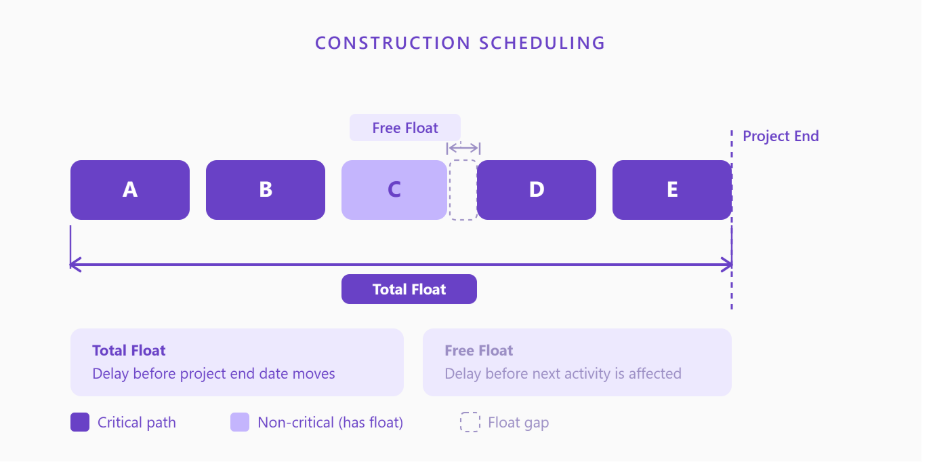
Float is how much time a construction activity can slip before it starts causing problems either for the project end date or for the next task in line. Knowing which type of float you are looking at changes how you act on it.
Key Takeaway
- Total float = how long an activity can slip before the project end date moves.
- Free float = how long it can slip before the next activity is delayed.
- Both come from a Critical Path Method (CPM) schedule.
- Zero total float means the activity is on the critical path.
- Free float is always less than or equal to total float for the same activity.
What Is Total Float in Construction?
Total float, sometimes called total slack, is the maximum number of days an activity can be delayed without pushing back the project’s planned completion date, provided all predecessor activities finish on time.
It is calculated across the entire project network, not just a single sequence. When a scheduler says an activity has 10 days of total float, it means the team has a 10-day window before that activity starts affecting the end date.
Activities with zero total float sit on the critical path. Delay one of them, and the finish date shifts. This is why tracking critical path activities is central to construction schedule management.
One thing worth understanding early: float is not free time. It is shared buffer across a path. The moment you treat it as if it belongs to a single activity, you risk the whole schedule.
What Is Free Float in Construction?
Free float (or free slack) is narrower. It is the amount of time an activity can be delayed without affecting the earliest start date of its immediate successor.
Think of it this way: total float is the buffer for the whole project. Free float is the buffer between one activity and the one directly behind it.
Because it only accounts for the next task downstream, free float is always equal to or less than total float for the same activity.
Free float is particularly useful for subcontractor coordination. If you need to tell a trade partner exactly how much flexibility they have before they affect the next crew on site, free float gives you that answer precisely.
Total Float vs Free Float: Side-by-Side
| Attribute | Total Float | Free Float |
| Also called | Total slack | Free slack |
| Measures delay impact on | Project finish date | Next activity’s early start |
| Can it be negative? | Yes (if project is already behind) | Rarely; usually 0 or positive |
| Used for | Critical path analysis | Subcontractor scheduling, handoffs |
| Scope | Entire project network | Activity-to-activity |
| Relationship to each other | Always >= free float | Always <= total float |
 Slack vs Float: Is There a Difference?
Not really. Float and slack refer to the same thing. Microsoft Project uses “slack,” Primavera P6 uses “float,” and the PMBOK Guide uses both “total float” and “free float.” Either term is fine in practice.
How to Calculate Total Float
Formula:
Total Float = Late Start (LS) − Early Start (ES)
Or equivalently:
Total Float = Late Finish (LF) − Early Finish (EF)
Both give the same result. You get these values by running a forward pass to find Early Start and Early Finish, then a backward pass to find Late Start and Late Finish.
Steps:
- Run the forward pass. Add each activity’s duration from Activity 1 to find ES and EF for every activity.
- Set the project end date. The last activity’s Early Finish becomes the planned completion.
- Run the backward pass. Subtract durations backward from the project end to find LF and LS.
- Apply the formula. Total Float = LS − ES (or LF − EF).
- Identify the critical path. Any activity where Total Float = 0 is critical.
How to Calculate Free Float
Formula:
Free Float = Early Start of next activity − Early Finish of current activity
If an activity has multiple successors, use the earliest Early Start among all of them.
Steps:
- Complete the forward pass to get ES and EF for all activities.
- For each activity, identify its immediate successor(s).
- Subtract the current activity’s Early Finish from the successor’s Early Start.
- If there are multiple successors, use the minimum value.
- That result is the free float for that activity.
Worked Example: A Five-Activity Fit-Out Sequence
Here is a five-activity sequence from a commercial fit-out project.
Activities and Durations:
| ID | Activity | Duration (days) | Predecessor |
| A | Frame Walls | 5 | None |
| B | Rough-In MEP | 8 | A |
| C | Inspections | 3 | B |
| D | Insulation | 4 | B |
| E | Drywall | 6 | C, D |
Forward Pass (ES / EF):
| ID | ES | EF |
| A | 0 | 5 |
| B | 5 | 13 |
| C | 13 | 16 |
| D | 13 | 17 |
| E | 17 | 23 |
Project end = Day 23.
Backward Pass (LF / LS):
| ID | LF | LS |
| E | 23 | 17 |
| C | 17 | 14 |
| D | 17 | 13 |
| B | 13 | 5 |
| A | 5 | 0 |
Total Float = LS − ES:
| ID | LS | ES | Total Float | On Critical Path? |
| A | 0 | 0 | 0 | Yes |
| B | 5 | 5 | 0 | Yes |
| C | 14 | 13 | 1 day | No |
| D | 13 | 13 | 0 | Yes |
| E | 17 | 17 | 0 | Yes |
Free Float for Activity C:
C’s Early Finish = 16. E’s Early Start = 17. Free Float = 17 − 16 = 1 day.
Inspections have 1 day of both total and free float. Everything else is on the critical path. If framing, MEP rough-in, insulation, or drywall slips by even a day, the project end date shifts.
Why This Matters on Real Projects
About 98% of North American construction projects run over schedule, with the average project finishing 37% later than originally planned (Buildern.com, Nov 2025). That is not purely a planning problem. A lot of it comes down to how float is managed during execution.
What usually happens: teams consume shared floats on non-critical activities without tracking the downstream effect. The critical path shifts. Activities that once had buffer suddenly have none. By the time the delay shows up on site, there is not much to do about it without real cost.
Four Mistakes That Eat Float Without Warning
1. Treating float individually owned. Float in a CPM network is shared across multiple activities on the same path. Both Activity B and Activity C might show 5 days of float. Using all of it on one activity leaves nothing for the other.
2. Ignoring negative floats. Negative total float means the schedule cannot meet its target completion date. That is a recovery situation, not a rounding error.
3. Not recalculating after scope changes. Every change order that adds activities or changes logic requires a schedule update. Float values from the original baseline go stale fast.
4. Mistaking free float for permission to delay. Free float tells you the next activity will not be pushed. It says nothing about resource conflicts, weather windows, or inspection to hold points that may still constrain the start of the following work.
When Float Analysis Needs Ground-Truth Data
Float analysis works when the CPM schedule reflects actual field conditions. The problem most project teams face is that schedule updates depend on accurate progress data, and that data is often estimated rather than verified.
When actual quantities installed are measured and fed into the schedule, float values reflect reality rather than someone’s Friday afternoon estimate. Tools like Track3D connect what is actually built on site to your schedule layer, so your float calculations stay grounded in current field conditions. A 1-day float on inspections shows up in the data before it quietly disappears and costs you a milestone.
Turn Schedule Float Into Early Warnings, Not Surprises
Float analysis is only as reliable as the field data behind it. When progress is estimated rather than measured, your critical path may already have shifted without the schedule showing it.
Track3D connects verified site progress to your schedule so your float calculations reflect what is actually happening on the ground. See how it works for your next project.
Frequently Asked Questions
Q1: What is the difference between total float and free float in construction scheduling?
Total float measures how much an activity can slip before the project end date is affected. Free float measures how much it can slip before the next activity in the sequence is affected. Total float covers the full project network; free float is activity-to-activity.
Q2: How do you calculate total float in construction?
Total Float = Late Start minus Early Start (or Late Finish minus Early Finish). Late Start and Late Finish come from a backward pass through the CPM network starting at the project completion date.
Q3: Can free float ever be greater than total float?
No. Free float is always equal to or less than total float for the same activity. They are equal when the activity’s only downstream constraint is its direct successor.
Q4: What does zero total float mean in a CPM schedule?
Zero total float means the activity is on the critical path. Any delay to that activity will push back the planned completion date.
Q5: Is float the same as slack in construction scheduling?
Yes. Float and slack mean the same thing. Microsoft Project uses “slack” and Primavera P6 uses “float,” but the underlying calculation is identical.
Q6: What happens when total float goes negative?
Negative total float means the schedule can no longer meet its target completion date without corrective action. Common recovery options include fast-tracking, crashing critical activities, or adjusting scope.