A project engineer opens a bid package for a new construction project. Buried in the appointment documents is one line: information management must conform to ISO 19650. The team has no time to read a standard mid-bid, so they approve the requirement and shelve it. Then the first audit arrives with questions nobody can answer.
The NBS Digital Construction Report 2025 found that nearly 88% of construction professionals use or plan to use building information modeling (BIM). ISO 19650 sets the rules for managing that BIM data across a project. This guide covers what matters on a live job and skips the legal text.
Key takeaways
ISO 19650 is an international standard for managing BIM information across a project’s life. It is not software.
A Common Data Environment (CDE) is the single agreed source for project information. The standard defines it directly.
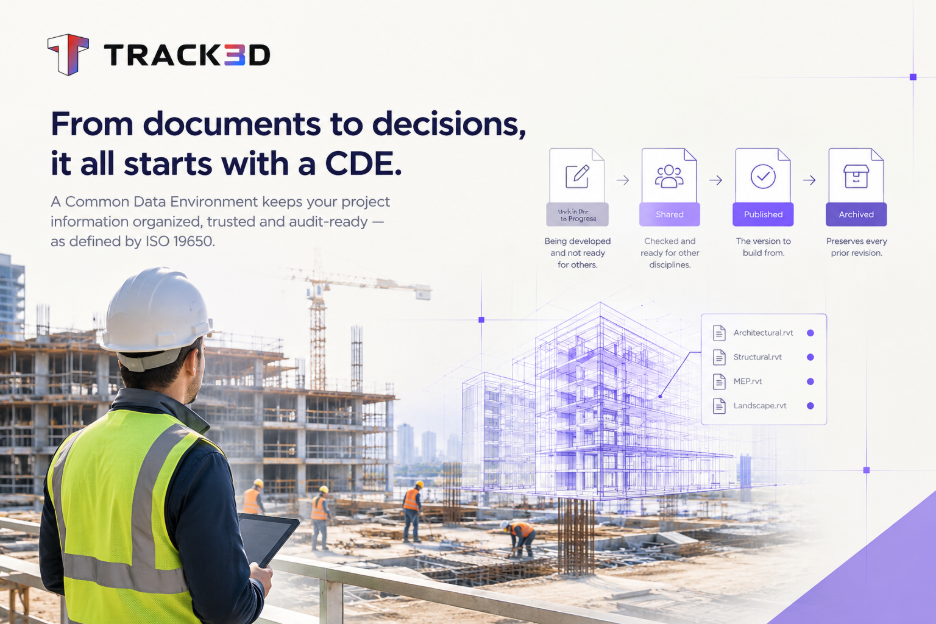
Every file in a CDE sits in one of four states: Work in Progress, Shared, Published, or Archived.
Certification applies to organizations and individuals separately, and most projects do not require it.
Most CDE failures trace back to unclear ownership of status changes. The choice of software matters less than teams assume.
A CDE and field verification solve different problems. A project needs both to keep the model tied to what the crew built.
What is ISO 19650?
ISO 19650 is a set of international standards for managing information about a built asset. It uses building information modeling (BIM) and covers the asset’s whole life.
The standard replaced the UK’s PAS 1192 framework and became an international standard in 2018. Part 1 covers concepts and principles. The other parts build on it and address delivery, operation, information exchange, security, and health and safety.
The standard does not tell a team which software to buy. It defines the roles, naming conventions, and approval process a project needs. Those rules keep BIM data accurate as the asset passes from designer to contractor to owner. UK public projects have required conformance for years. US owners increasingly write it into contracts on international and joint venture work.
Why does ISO 19650 matter on a construction project?
A construction project passes information through many hands: designers, the general contractor, trade partners, and the owner. Every handoff is a chance to lose data, duplicate it, or work from an old version.
ISO 19650 gives every party the same rules for how information is requested, produced, reviewed, and handed over. The benefits show up in outcomes. Teams spend less time arguing over which drawing is current. Owners receive cleaner records at handover. Contractors hold a documented trail when a change order comes into question.
The standard also sets clear roles. The appointing party states what information it needs. The appointed parties deliver it in an agreed format. Nobody guesses.
What is a Common Data Environment?
The ISO 19650 common data environment definition comes directly from ISO 19650-1. A CDE is the agreed source of information for a project. The team uses it to collect, manage and disseminate every information container through a managed process. In practice, it replaces scattered folders, email threads, and outdated links with one source the whole team trusts.
Each file carries a status. Work in Progress means the team is still developing the content, so other trades should not rely on it. Shared means the team has checked it, so other disciplines can build on it. Published is the version a contractor can construct from.
Archived keeps every earlier version. That record gives an owner or insurer an audit trail years later.
Shared drive CDE under ISO 19650 File status None Four defined states Ownership Whoever uploaded the file A named person approves each status change Naming Varies by person One agreed convention Audit trail Manual, if it exists Logged automatically
How does information move through an ISO 19650 project?
The process starts with requirements. The appointing party, usually the owner, defines what information it needs and why. ISO 19650 splits those needs into organizational, asset, project, and exchange information requirements.
The lead appointed party answers with a plan. That plan typically includes a BIM execution plan and a master information delivery plan, which set out who produces which information and when.
Task teams then create the information containers. Each container moves through the CDE states, from Work in Progress to Shared to Published, with a named person approving each step. At handover, the owner receives the published record and the archived history behind it.
Why do teams resist a CDE?
Most teams resist because the current process is familiar, not because the idea is wrong. A superintendent knows which drive holds last week’s drawings, even if no one else does. That private knowledge feels safer than a new system that has not yet earned trust.
The cost appears late. A trade installs against an outdated model revision. The rework bill arrives weeks later with no owner attached.
Disputes follow the same path. A pay application stalls because the GC and the sub reference two different “final” sets. Neither event looks like a technology problem when it happens. Each looks like an isolated incident, and repeated incidents become routine. ISO 19650 exists to break that routine.
How does a CDE work day to day?
Naming conventions come first. A file name should tell the reader the discipline, the zone, and the revision before anyone opens it. ISO 19650 recommends a consistent structure for this. Once a team adopts one, finding the right file no longer depends on guesswork.
Suitability codes come next. The team tags every container with its status, and one named person decides when it moves from Shared to Published. That single owner separates a CDE from a shared folder.
An audit trail runs underneath. The CDE logs revisions, status changes, and approvals automatically. When someone challenges a change order months after the work is complete, that log protects the contractor.
How do you set up a CDE on a project?
A workable setup follows five steps.
- Name an information manager who owns status changes.
- Agree on a naming convention before anyone uploads a file.
- Define the four statuses and list who can change each one.
- Confirm the platform logs every revision and approval.
- Schedule regular reviews that compare the model against site conditions.
Teams most often skip step five. A CDE keeps documents consistent with each other. It does not keep them consistent with the site.
What are the most common CDE mistakes?
Many teams assume a well-organized shared drive is a CDE. It is not. A drive with sub folders for Architecture, Structural, and MEP looks orderly, but it has no status codes, no owner, and no audit trail.
That setup solves storage and leaves governance untouched. The same gap sits behind wider construction data hygiene problems.
The second mistake is a stale model. Teams treat a model published at the start of a phase as current three months later, even after field conditions and change orders have moved on. No one owns the update, so nobody checks it until a dispute forces a review. By then the rework has usually started.
Both problems share a first fix: name an information manager. Even a small project without a full-time role needs one person who owns status changes. Without that owner, the CDE becomes a better-organized version of the same problem.
When is a full CDE not a fit?
A full ISO 19650 setup may be more than a small job needs. A single-discipline renovation with a short schedule and no owner requirement rarely justifies a formal information management plan. Check the contract first. If the appointment documents do not reference the standard, a lighter version can work.
That lighter version still needs a naming convention, clear statuses, and one person who owns approvals. Those three habits cost little and prevent most of the rework described above.
Where does field verification fit alongside the CDE?
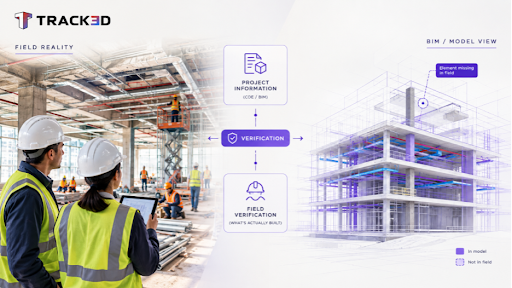
A CDE governs the model and the documents. It cannot confirm that the build matches the model. A person still has to verify conditions on site.
Reality Intelligence adds that layer. Track3D compares captured site conditions against the model held in the CDE. It treats the model as a digital twin instead of a static reference, and it flags where reality has drifted from plan.
At Hensel Phelps, consolidating that verification step replaced 20-plus separate monthly job walks with one. On a single airport project, it cut nearly 3,000 hours of manual coordination.
Governance comes before software. A well-run CDE keeps the paperwork accurate, and field verification keeps that paperwork connected to site conditions. The guide linked above explains the comparison in more detail.
Frequently asked questions
What is BIM under ISO 19650?
BIM is the digital modeling process that ISO 19650 governs. The standard does not define BIM itself. It defines how teams manage, share, and verify information created through BIM, from design through operation.
What is a Common Data Environment under ISO 19650?
It is the single agreed source of project information. The standard expects teams to use it in place of scattered folders and email attachments. Every file has a status, and the CDE logs every status change.
What are the four status states in a CDE?
Work in Progress, Shared, Published, and Archived. Work in Progress covers content under development. Shared means other disciplines can rely on it. Published is the construction-ready version, and Archived holds every prior revision.