Most drywall subcontractors know where their job stands. Turning that knowledge into numbers the office and the general contractor can use is where it takes real work. Drywall progress tracking means walking every level, highlighting plans, and checking the results against spending, every single week.
At Diversified Interiors of El Paso, that work now starts with a Track3D progress report. For Christian Rogers, Operations Manager, Track3D backs up his own read of the site with data. It helps him plan the week ahead and saves his team about 6 hours a week on progress tracking. Work that used to take about 8 hours now takes 2 hours.
Diversified is working under a major general contractor on a multi-building project. We caught up with Christian to hear how Track3D fits into his team’s week, from the office to the crew’s weekly plan on site.
Key Takeaways
- Diversified Interiors saves 75% of its weekly progress tracking time, going from about 8 hours to 2 by replacing manual plan highlighting with quantified progress data from Track3D.
- The field team checks each progress report against its own read of the site, then builds the crew’s plan for the week.
- Installed progress measured by location gives the team reliable data for billing and pay applications.
- Progress delta and done vs. not done views show what changed and what’s left, by location.
- The Trends view shows early on whether production is keeping pace with the project schedule.
- Leadership reviews every capture remotely, and shared links give anyone a view of the site without a Track3D login.
- Dated captures give the team a clear visual record of completed work.
“We Don’t Have to Go Highlight a Bunch of Plans”
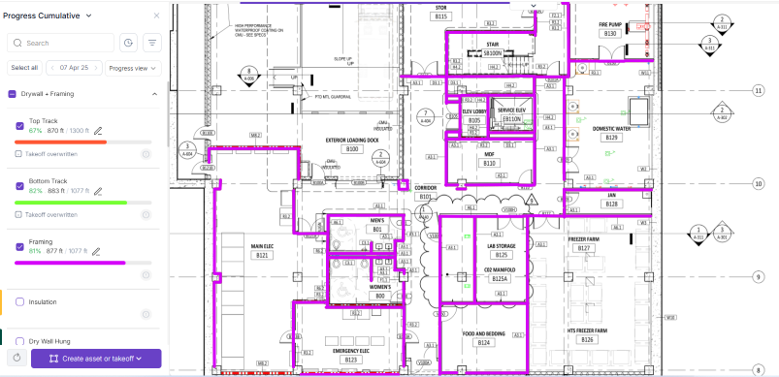
Before Track3D, knowing where the job stood meant walking every level, then highlighting plans by hand to work out percent complete in each area. That took about 8 hours a week, 2 to 3 hours per building. Today, progress tracking takes about 2 hours a week in total: the team walks the site for captures, reviews the data in Track3D, and starts each week with the numbers already in hand.
After every capture, Track3D measures what was installed, area by area, and maps it onto the drawings. Christian and his team check those numbers against what they saw on site, and every number is backed by the 360 captures from that walk, so they can see exactly what’s behind it.
“We don’t have to actually get in the weeds and go highlight a bunch of plans and try to figure out where we are, which is pretty time-consuming,” Christian says.
From there, the office team compares installed progress with what has been spent, giving a clear view of whether the job is on budget.
The same numbers carry through to billing. With installed progress measured by location, the team can back up its pay applications with data rather than estimates and go into billing conversations with the general contractor confident in the numbers.
Drywall Progress Tracking That Shapes the Week Ahead
Out in the field, Christian compares the weekly progress report with his own read of the site. He identifies where to focus the crew’s effort, then talks it through with them in person.
“It’s good to see what I have in my head on paper,” he says.
Of all Track3D’s capabilities, the side-by-side comparison stood out most to Christian. It places site captures next to the 2D drawing, with installed progress color-coded by area. He calls it “a big game changer as far as what I can actually figure in for the next plan for the next week.”
Two more capabilities help the team turn that picture into clear next steps:
- Progress delta shows what was installed between any two captures, and where.
- Done vs. not done overlays the takeoff on the progress view, so the remaining work is easy to see.
Together, these views show which areas are ready for the crew and which need attention next, so each week’s plan is built on what’s been installed.
Knowing Early Whether the Job Is on Pace
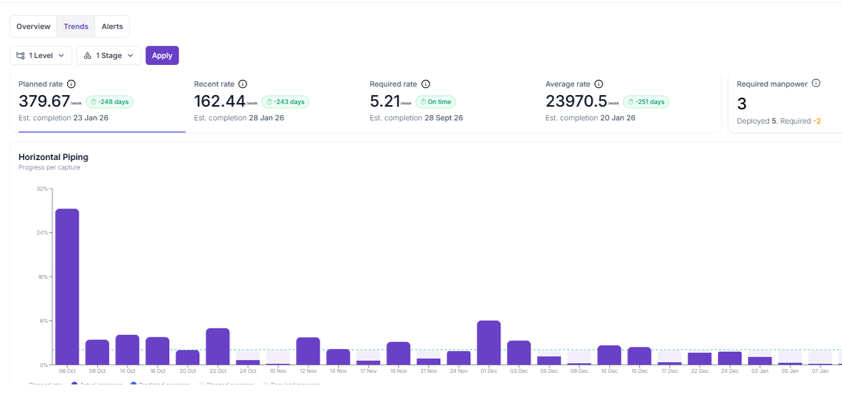
Each weekly plan also needs to line up with the overall project schedule. Once a schedule is loaded, Track3D’s Trends view compares the planned pace with the crew’s recent and average pace, and shows the pace needed to finish on time. Any updates the team makes to progress carry through to the trend from that capture date, so the forecast always reflects the latest data.
Christian summed it up simply: “It’s a pretty sweet feature.” For trade partners, the Trends view offers an early signal on whether production is keeping pace, while there’s still time to adjust.
Keeping Leadership in the Loop
Site visibility extends well beyond the jobsite. Diversified’s owner reviews every new capture, which keeps him close to the project wherever he is.
Shared links take that visibility further. The team can send a 360 walk or a full level view to anyone with an internet connection, with no Track3D account required. For contractors managing several projects at once, it’s a simple way to stay close to every site.
A Clear Record of Completed Work
As the job moves forward, other trades will work around finished drywall, and the work already in place can be affected. At those moments, it helps to have a clear record of what Diversified has already completed.
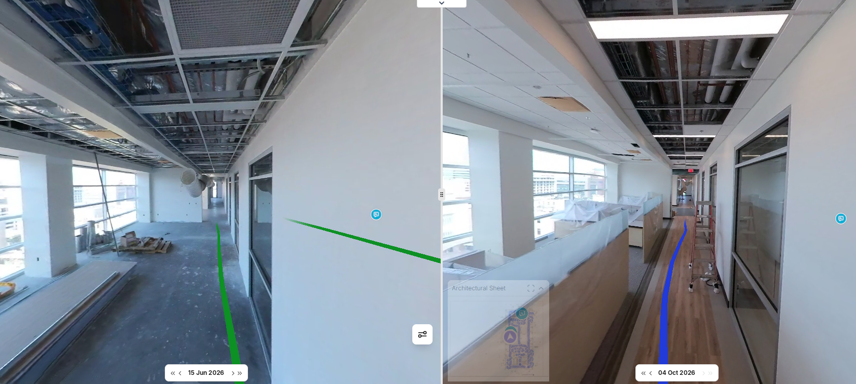
Every Track3D capture is dated, so the team can place two captures side by side and show exactly what was installed and when. Conversations about completed work with the general contractor are backed by visual records.
Christian expects this to become even more valuable as the project progresses. The same record also supports smooth handovers and closeouts.
Ready to See Where Your Project Stands, Objectively?
Diversified now saves 75% of the time it used to spend on progress tracking, going from about 8 hours a week to 2. Those hours go back into running the job, and your team can make the same shift.
Book a demo to see how Track3D handles progress tracking on your project.
Frequently Asked Questions
Q: How does Track3D help drywall subcontractors track progress?
A: Crews capture the site with a 360 camera. Track3D maps installed progress back onto the drawings, so teams can review percent complete by location instead of highlighting plans by hand.
Q: Why should trade partners track their own progress?
A: Their own progress data supports crew planning, cost tracking and pay app conversations with the general contractor. It also gives them a dated record of completed work.
Q: What does a progress delta show in Track3D?
A: In Track3D, a progress delta shows what was installed between any two captures, and where. Teams use it to see what changed since the last walk.
Q: Can someone without a Track3D login see site captures?
A: Yes. Shared links open a 360 walk or a full level view with an internet connection. They do not include progress data.